

Blogs
March
AI inside a CRM is powerful, but many teams hit the same blockers: privacy concerns, unpredictable API costs, and the friction of sending sensitive data to third-party providers. That’s why local LLMs are getting popular—especially for internal workflows like summaries, drafts, and quick intelligence that your users want inside SuiteCRM.
This guide shows how to use Ollama local LLM to enhance SuiteCRM workflows securely and efficiently—plus how SuiteAI Insight can bring those results into the CRM UI.
Ollama makes it easy to run modern LLMs locally (macOS & Linux). And when you want those local AI capabilities inside SuiteCRM (without glue code), SuiteAI Insight can connect SuiteCRM workflows to your Ollama instance.
How it works
- Install Ollama on macOS or Linux.
- Pull and test a model (for example, Mistral or Llama).
- Configure SuiteAI Insight with Ollama endpoint and model.
- Run AI actions inside SuiteCRM records and emails.
- Optimize prompts, model choice, and hardware for your workload.
1) Using Ollama Local LLM for SuiteCRM AI workflows
Artificial Intelligence is rapidly becoming a core part of CRM systems. But many organizations hesitate to use cloud-based AI providers because of data privacy, cost, and control.
This is where Ollama comes in. Ollama allows you to run Large Language Models (LLMs) locally, giving you full control over your data while still benefiting from AI-powered insights.
Ollama is a lightweight tool that lets you run popular models like Llama 3, Mistral, Phi, and Mixtral directly on your local machine or server. Instead of sending prompts and context to external APIs, everything can run on infrastructure you own.
2) Benefits of Ollama for real teams
- Data control & privacy posture – you choose where inference runs and who can access the server.
- Predictable costs – no per-token billing surprises during busy weeks.
- Low-latency LAN experience – fast responses when Ollama is close to SuiteCRM (same network/VPC).
- Model flexibility – pick models optimized for speed, quality, or language support.
- Offline potential – useful in restricted networks or on-prem environments.
Who Should Use Ollama with SuiteCRM?
- Organizations with strict data privacy requirements
- Teams looking to reduce AI API costs
- Companies running on-premise CRM systems
- Businesses wanting full control over AI models
3) Local Ollama vs cloud LLMs for CRM (when to use what)
A simple way to decide is to start with your constraints:
| Feature | Ollama (Local) | Cloud AI |
|---|---|---|
| Data Privacy | Full control | External processing |
| Cost | No API cost | Pay per usage |
| Setup | Requires setup | Easy |
| Performance | Depends on hardware | High |
| Scalability | Limited by server | Highly scalable |
Many organizations end up hybrid: local Ollama for everyday CRM tasks, and cloud models for rare, complex tasks where quality must be maximal.
4) Setup Ollama (macOS & Ubuntu)
Below is a quick start for macOS and Ubuntu that works well for testing and internal deployments.
# macOS (Homebrew)
                brew install ollama

                # Ubuntu / Linux
                curl -fsSL https://ollama.com/install.sh | sh

                # Verify version (optional)
                ollama --version

                # Pull a starter model (pick one)
                ollama pull llama3.1
                ollama pull mistral
                ollama pull phi
                ollama pull mixtral

                # Run a quick test prompt
                ollama run mistral "Write a short 3-bullet summary of a sales call note."

                # List installed models
                ollama list
For teams, you’ll typically run Ollama as a service and keep it reachable only from your internal network where SuiteCRM runs. (The exact service/network settings depend on your server setup and security requirements.)
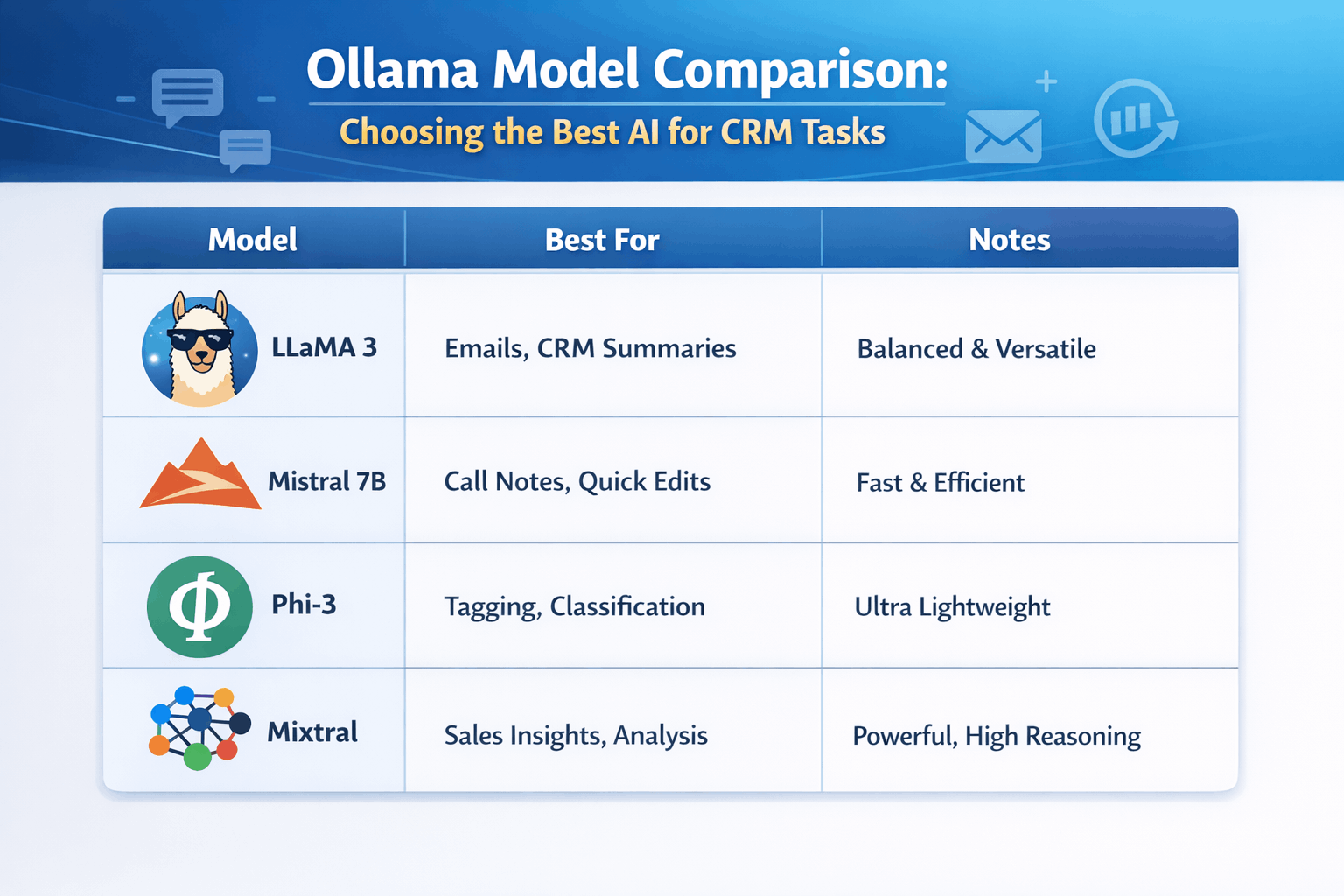
5) Ollama model comparison: choosing the right model for CRM tasks
Picking a model is mostly about balancing speed, quality, and hardware. Smaller models respond faster on CPU; larger models tend to produce better writing and reasoning but need more RAM/VRAM.
A practical “starter set” for CRM workflows:
- Fast & lightweight – for classification, short rewrites, quick summaries.
- Mid-size & balanced – for better drafts, more consistent tone, more accurate extraction.
6) Where SuiteCRM benefits from local Ollama
Once you have Ollama running, the next question is: how do end users actually benefit inside SuiteCRM without copy-pasting text into a terminal window?
That’s where an integration layer matters. You want consistent prompts, permissions, and a clean user experience inside SuiteCRM (emails, notes, record views)—not a separate tool people forget to use.
7) SuiteCRM + Ollama integration SuiteAI Insight
SuiteAI Insight connects SuiteCRM workflows to your AI provider. When configured for Ollama, it can send carefully scoped text to your local Ollama endpoint and return the result directly into SuiteCRM.
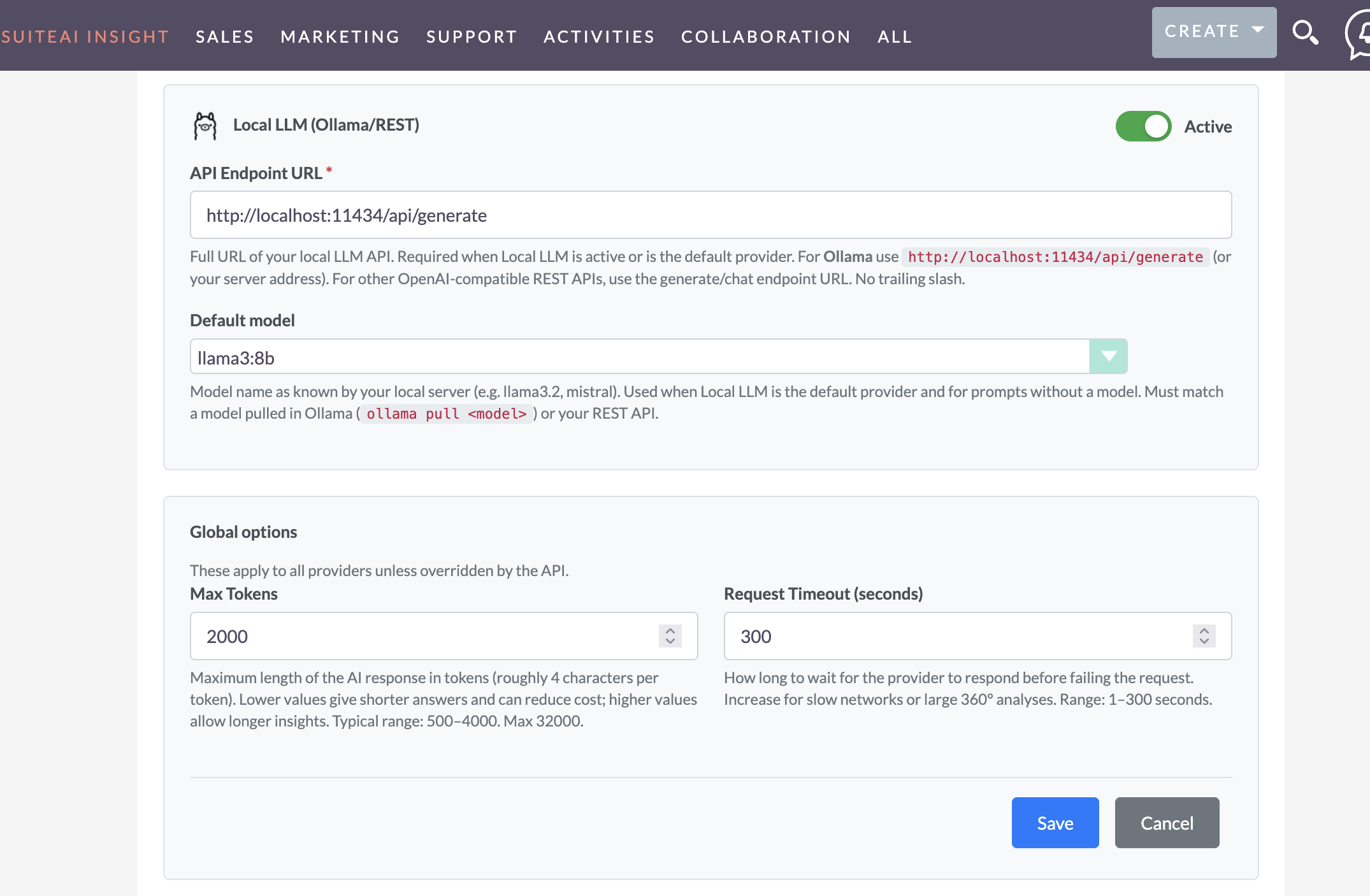
- Endpoint – your Ollama server URL (internal network).
- Model – the model name you want SuiteCRM users to run by default.
- Timeouts – keep UX responsive; avoid long-running prompts in interactive screens.
- Governance – decide which users/modules can run which prompts (based on your SuiteAI setup).
8) Real SuiteCRM use cases powered by Ollama (local LLM)
These are high-impact, low-risk workflows where local LLMs shine.
Lead / Account summary
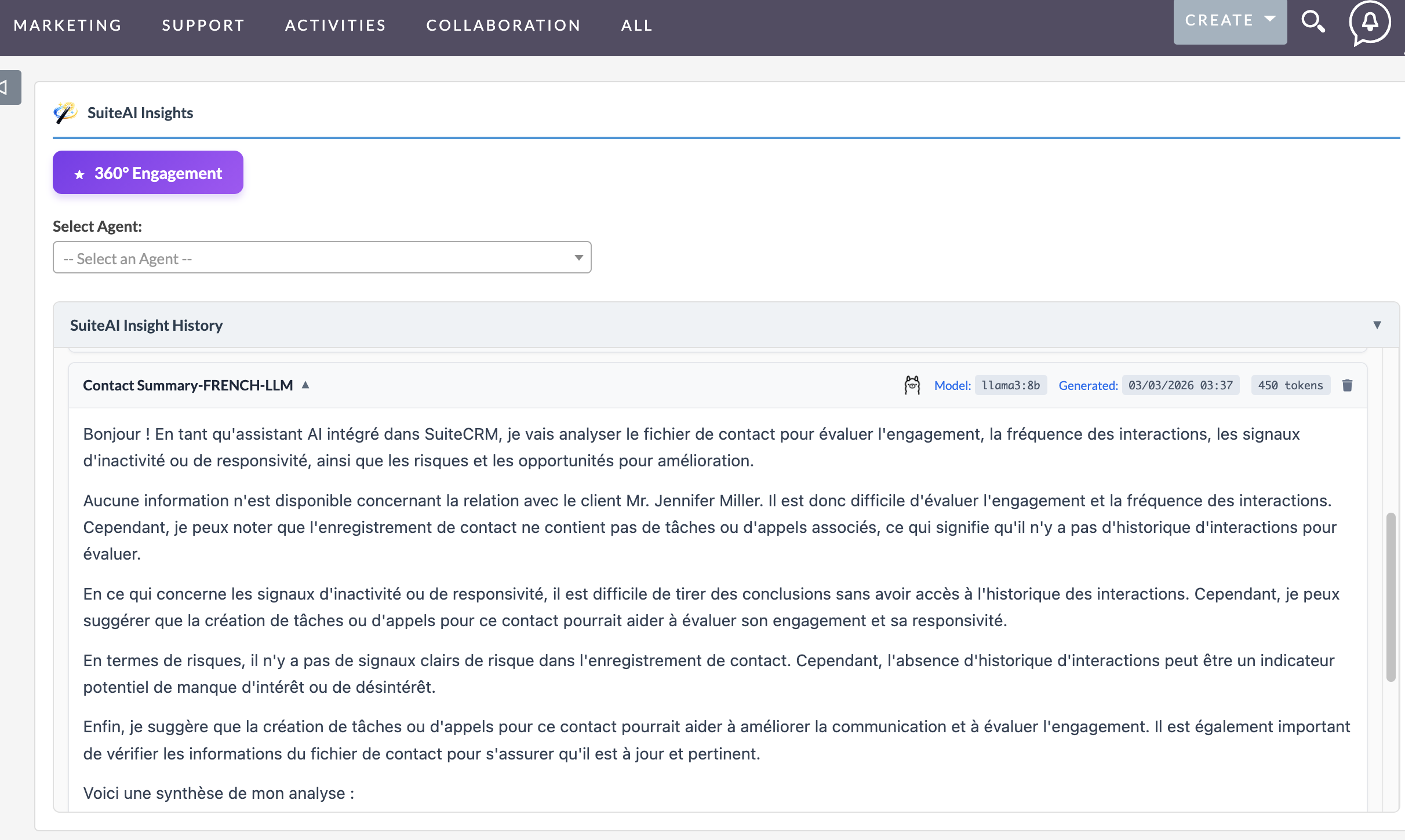
Turn a long activity timeline into a clean summary: key context, last touch, pain points, and suggested next step—right on the record.
Example: AI summary in SuiteCRM
A sales user opens an Account record with multiple calls and tasks. Instead of reading all notes, AI generates:
- Key discussion points
- Last interaction summary
- Recommended next action
Email drafting and rewriting
Draft a reply in a consistent tone, shorten a long email, or rewrite to be more professional. Users stay in SuiteCRM; no external tool needed.
Case / ticket recap
Summarize the issue, actions taken, and recommended resolution steps to speed up handoffs and reduce time-to-close.
Call notes cleanup
Convert rough notes into clean bullets, action items, and follow-ups that can be saved back to the record.
9) Operational tips and limitations
- Hardware reality – CPU works for many tasks, but higher concurrency and better quality often benefits from GPU.
- Concurrency – plan for peaks (support queues, campaign bursts). Consider a dedicated Ollama host.
- Prompt discipline – send only what you need; avoid dumping entire records when a short context is enough.
- Quality expectations – local models can be excellent, but cloud frontier models may still win in complex reasoning.
Frequently asked questions
Quick answers about running Ollama local LLM and connecting it to SuiteCRM workflows.
Is Ollama suitable for production CRM workflows?
Yes—especially for internal workflows like summaries, drafts, and classification. For production, treat Ollama like any internal service: secure it, monitor it, and size hardware for peak usage.
Which Ollama model is best for SuiteCRM tasks?
Start with a fast model for quick summaries and rewrites, then add a mid-size model for higher quality drafting. The “best” choice depends on response time targets, concurrency, and the languages your team needs.
How do we connect SuiteCRM to Ollama?
SuiteCRM typically needs an integration layer to call Ollama consistently and insert results back into the UI. SuiteAI provides that connection by configuring an Ollama endpoint and model, then exposing AI actions in SuiteCRM workflows.
Run AI locally with Ollama and bring it into SuiteCRM with SuiteAI – practical automation with more privacy and control.
At a glance
Run Ollama local LLM on your infrastructure and use it inside SuiteCRM via SuiteAI Insight. This approach helps teams improve privacy, control AI costs, and automate CRM tasks like summaries, email drafting, and case recaps.
The problem
Cloud-only AI introduces data governance concerns, variable per-token costs, and workflow friction when teams must leave SuiteCRM to use AI tools.
The solution
Use Ollama locally for private inference, then expose trusted AI actions directly in SuiteCRM through SuiteAI Insight for fast, consistent day-to-day CRM automation.
Comments
- No Comments Found.