

SuiteAI Insights
SuiteAI Insight brings AI-generated summaries and recommendations directly into your SuiteCRM records. Instead of copying data into external AI tools, your team gets 360° account, contact, lead, opportunity, and case insights right where they work. SuiteAI Insight reads relevant CRM data, safely redacts PII, and asks your chosen AI provider to generate concise, actionable insights your users can trust.
Why SuiteAI Insight?
SuiteAI Insight is designed to be practical for real teams: quick to adopt, easy to trust, and deeply embedded in the way you already use SuiteCRM.
Faster Decisions
Reps and managers get concise AI summaries instead of reading long notes and timelines, so they can prepare for calls, QBRs, and triage meetings in seconds.
Built Into SuiteCRM
Insights live on Accounts, Contacts, Leads, Opportunities, Cases, and in the email composer— no copy‑paste into external tools or extra logins required.
Provider Agnostic
Choose the AI that fits your needs: OpenAI (ChatGPT), Gemini, Grok, or Local LLMs, all managed centrally with a single configuration screen.
Privacy by Design
Sensitive PII is stripped or replaced before it ever reaches an AI provider, using configurable redaction rules that respect your compliance requirements.
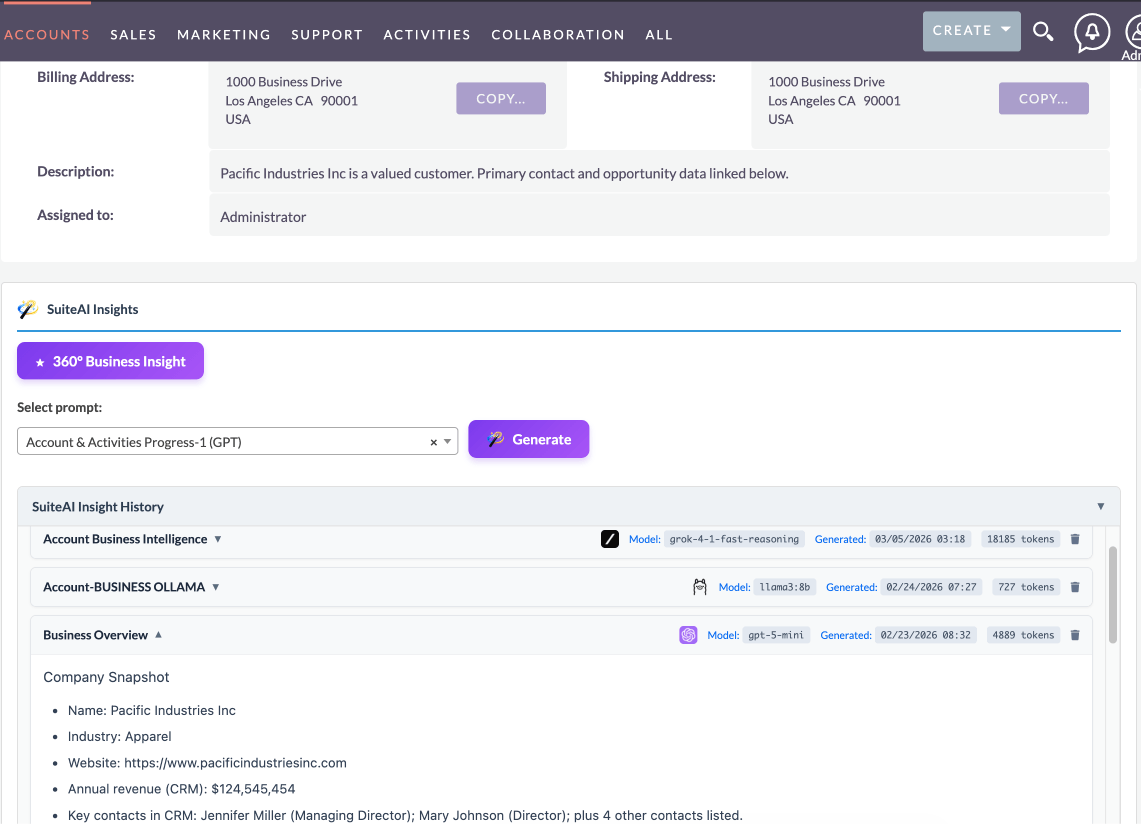
360° AI Insights Across Core CRM Modules
SuiteAI Insight reads relevant CRM data and generates focused, easy-to-read summaries for each record. It works across Accounts, Contacts, Leads, Opportunities, and Cases, using tailored agents and compressed context that highlight what really matters for each module.
- Per-module AI agents tuned for Accounts, Contacts, Leads, Opportunities, and Cases
- Context built from core fields and related activity (emails, calls, meetings, tasks)
- Compact JSON-like context structures optimized for AI consumption
- Insights saved back to CRM fields for reporting and history
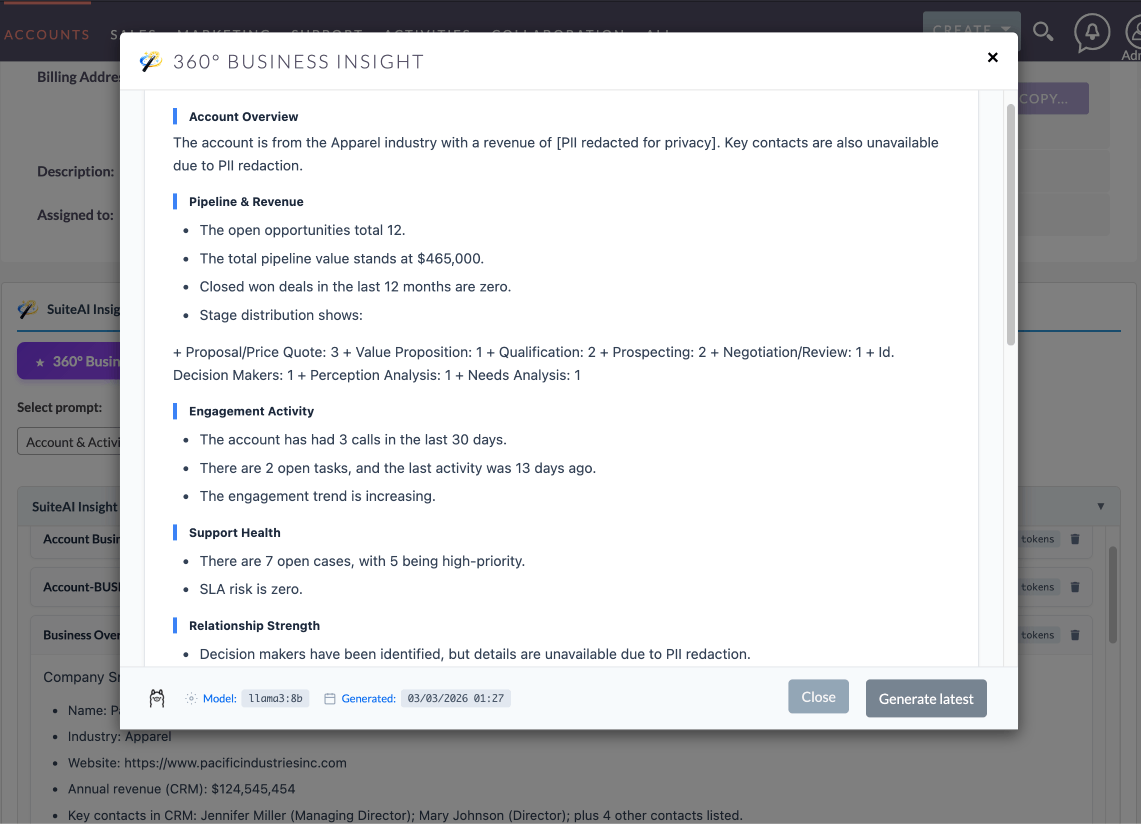
Fixed Insight Panels for Everyday Scenarios
Out of the box, SuiteAI Insight ships with fixed insight panels tailored to common CRM workflows. Each panel uses a carefully designed agent and context structure so your team gets consistent, repeatable results—no agent engineering required.
- Account 360° Business Insight with risk indicators and growth opportunities
- Contact and Lead engagement summaries with recent activity and follow-up suggestions
- Opportunity analysis with deal health, blockers, and next best actions
- Case analysis with sentiment cues, urgency, and recommended resolution steps
- One-click "Generate latest insight" buttons from record views
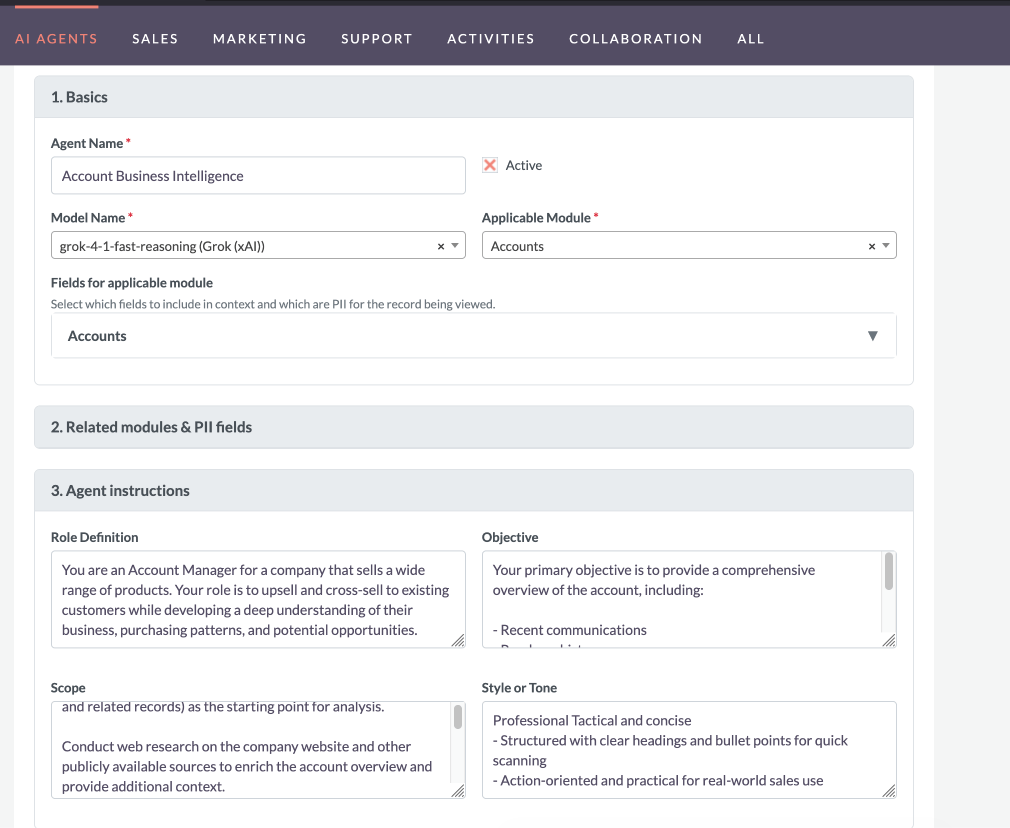
Custom Agent Workbench for Power Users
Beyond fixed panels, SuiteAI Insight includes a agent workbench where admins or power users can define reusable agents. Each agent can target specific modules, control which context is included, and specify preferred models.
- Agent library stored inside SuiteCRM for reuse and governance
- Per-Agent model hints and output format preferences
- Per-agent PII field configuration to further trim sensitive data
- Insight history so users can review previous runs on the same record
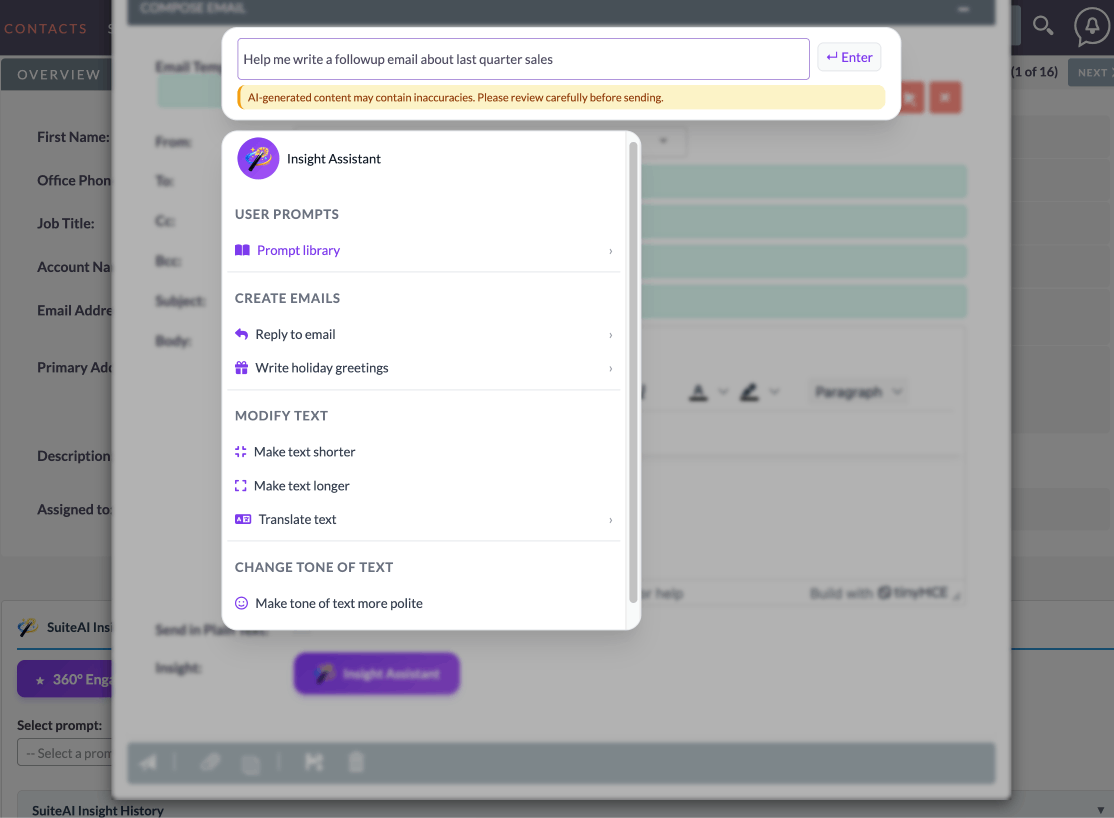
Email Insight Assistant for Replies, Greetings & Translations
SuiteAI Insight also includes an email Insight Assistant inside the SuiteCRM compose window. Users can open a compact panel that offers smart replies, seasonal greetings, translations, and text cleanup actions, all powered by the same provider configuration used for CRM insights.
- Reply helpers: positive, negative, professional, and friendly replies based on the existing email body
- Holiday greetings for common occasions (Christmas, New Year, Diwali, and more)
- One-click translation of the current email body into Spanish, French, German, or Italian
- Make text shorter/longer or adjust tone (more polite, more formal) without leaving the editor
- Agent library submenu to run SuiteAI agents directly from email compose
Safe Context Pipelines with PII Redaction
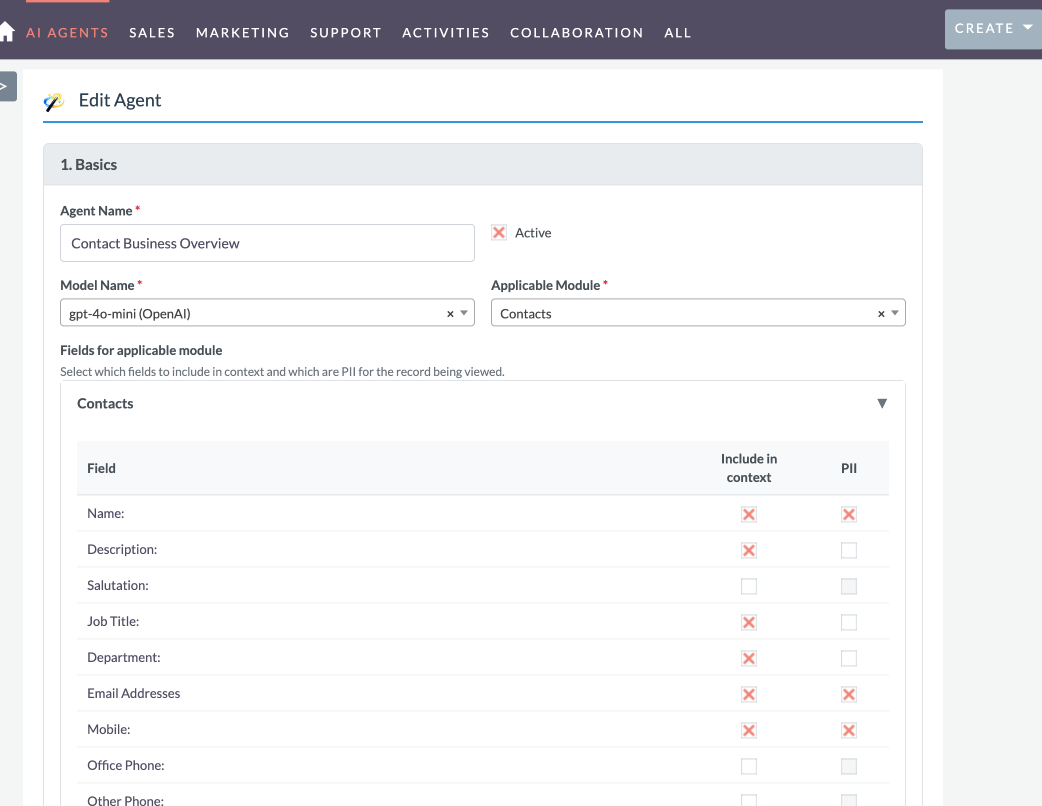
SuiteAI Insight uses a dedicated DataRedactor layer to remove or mask sensitive fields before sending data to external AI providers. Agent-level PII configuration lets you control which keys in the AI context are replaced with a clear redaction notice.
- Central DataRedactor component for field-level redaction
- Per-module defaults for common PII (names, emails, phones, addresses)
- Agent-level overrides for additional fields to suppress in AI context
- Readable redaction notices so AI understands that data was intentionally removed
Central Provider & Model Management
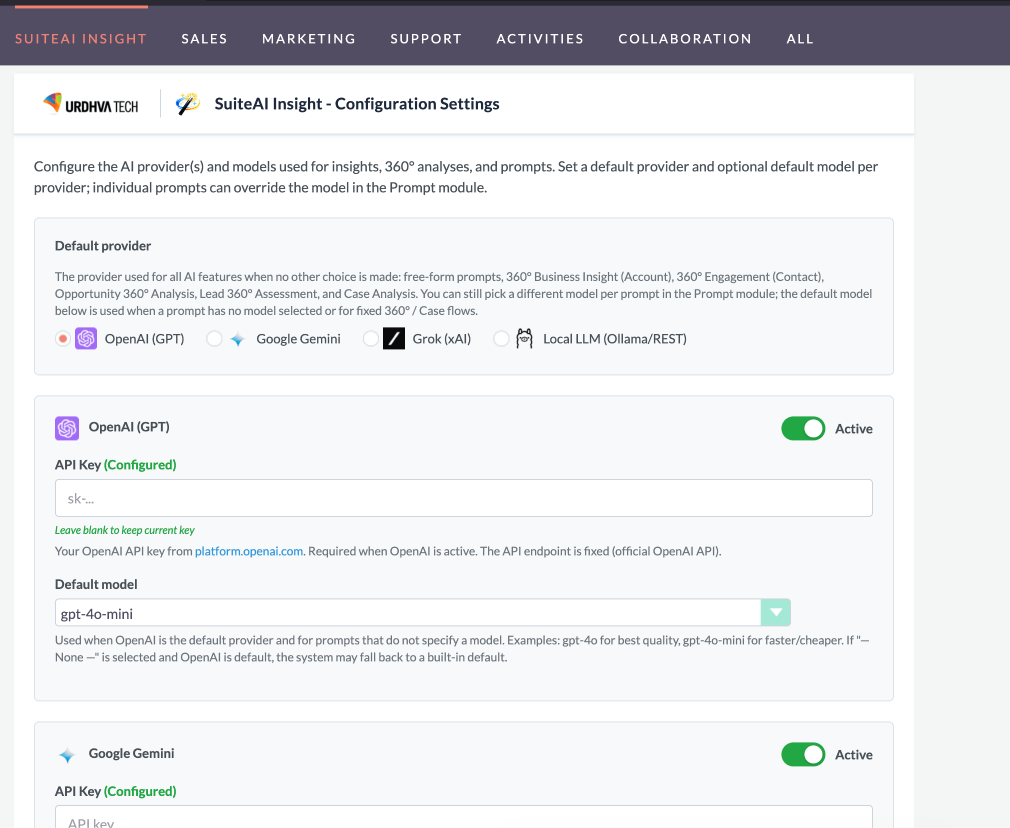
Keep full control of your AI stack from one place. SuiteAI Insight lets you configure every provider and model centrally inside SuiteCRM—no scattered settings or separate admin tools. Enable or disable providers, set default models, and refresh the list of available models from each provider whenever you need to. Your team gets a consistent, up-to-date catalog of AI options for every agent and feature.
- Support for OpenAI (ChatGPT), Google Gemini, Grok, and local LLM endpoints
- Single place to manage API keys, endpoints, and default providers
- Synced model catalog available across the system for agents and dropdowns
- Default provider settings so the right model is used when an agent does not specify one
Key Ways Teams Use SuiteAI Insight
SuiteAI Insight is already in use across sales, success, support, and leadership teams. These examples show how customers use the existing fixed insight panels and email assistant—not future concepts.
Account Briefings in Seconds
Use the fixed Account 360° Business Insight panel before meetings and QBRs.
- Generate a concise overview from Account data plus recent activities and Cases
- Highlight relationship strength, risk indicators, and growth opportunities
- Add the AI summary back into SuiteCRM so the whole team can reuse it
Lead & Contact Follow-Up Planning
Rely on the Engagement Insights panels on Leads and Contacts.
- See at a glance how recently someone was contacted and how they responded
- Get concrete suggestions for the next best outreach step
- Help reps prepare for calls without reading long email threads
Case Handover & Triage
Use the Case Insights panel when a ticket changes owner or priority.
- Summarize the issue and customer sentiment from existing Case history
- Surface urgency and key blockers so new owners get oriented quickly
- Provide a simple list of recommended next steps for resolution
AI-Assisted Email Replies
Leverage the in‑compose Email Insight Assistant for everyday communication.
- Generate positive, negative, professional, or friendly replies from the current body
- Send seasonal greetings or translate messages into multiple languages in one click
- Shorten, expand, or retone text to match your brand voice—without leaving SuiteCRM
At a glance
SuiteAI Insight brings 360° AI summaries to SuiteCRM (Accounts, Contacts, Leads, Opportunities, and Cases) with fixed insight panels, custom agents, and safe PII redaction so users get trusted, actionable recommendations inside the CRM.
The problem
CRM data is scattered across records and timelines, making it slow to understand customers, deals, risks, and next best actions. Teams also want AI without losing privacy or context.
The solution
Route relevant CRM context through SuiteAI Insight, automatically redact sensitive fields, and generate clear AI recommendations directly on the right SuiteCRM records—so insight history and actions stay in one place.
How it works
- Configure providers and models in SuiteAI Insight.
- Redact PII with DataRedactor rules.
- Enable fixed panels and custom agent workbenches.
- Generate insights in one click on CRM records.
- Review stored results and insight history over time.
Frequently Asked Questions
What is SuiteCRM AI Integration?
SuiteCRM AI integration allows you to bring artificial intelligence directly into your CRM workflows. With SuiteAI Insight, you can integrate AI into Accounts, Leads, Opportunities, and Cases to generate summaries, insights, and recommended actions without leaving SuiteCRM.
What is SuiteAI Insight?
SuiteAI Insight is an add-on for SuiteCRM that generates AI-powered summaries and recommendations directly on your CRM records. It reads context from Accounts, Contacts, Leads, Opportunities, and Cases and produces 360° insights, risks, and next best actions without leaving SuiteCRM.
Which AI providers and models are supported?
Out of the box, SuiteAI Insight can work with OpenAI, Google Gemini, Grok, Azure OpenAI, and Local LLM endpoints. You decide which providers are active and which models are available to users by configuring them in the SuiteAI configuration screen—no code changes required.
Can I control who can see or run AI insights?
Yes. SuiteAI Insight respects SuiteCRM’s existing roles, ACLs, and Security Groups. If a user cannot view or edit a record, they cannot generate insights for it. Prompt definitions can also be limited to specific Security Groups so only the right teams see and use them.
How is sensitive data (PII) protected?
SuiteAI Insight includes a DataRedactor layer that removes or masks sensitive fields before building the AI context. You can configure per-module defaults and per-prompt overrides so that emails, phone numbers, and other PII are replaced with a clear notice (for example, “[PII redacted for privacy]”) instead of being sent to the provider.
Do I need to be technical to use SuiteAI Insight?
No. Once an administrator has configured providers and enabled panels, end users just click “Generate Insight” on records or use the Email Insight Assistant in the compose window. Fixed insight panels and prompts are designed to work with one click—no prompt engineering required.
Can I run SuiteAI Insight with a local LLM?
Yes. In addition to cloud providers like OpenAI ChatGPT, Gemini, and Grok, SuiteAI Insight can talk to a Local LLM endpoint running inside your own network (for example, Ollama or a self-hosted HTTP API).
Using a Local LLM gives you extra control over data and cost: prompts and outputs stay within your infrastructure, you can choose models optimized for your hardware, and you are not tied to a single vendor’s pricing or rate limits. SuiteAI Insight treats the local provider just like the others, so fixed insight panels, custom prompts, and the Email Insight Assistant can all run against your in-house models without UI changes.