

Voice AI assistant
Voice AI Assistant for SuiteCRM
VozerAI answers the phone and writes the outcome into SuiteCRM—so coverage becomes CRM follow-through, not another silo.
What is a Voice AI Assistant for SuiteCRM?
An AI voice receptionist is a conversational phone agent that answers inbound calls, understands why someone called, and takes a useful next step—such as capturing details, scheduling, summarizing, or escalating to a person.
For SuiteCRM users, “for SuiteCRM” means outcomes fit your CRM-centered process: who owns the next action, what context the team needs, and how customer history stays coherent. SuiteCRM environments are customized—modules, fields, workflows, and reporting differ by deployment—so VozerAI supports configurable CRM outcomes rather than forcing a one-size-fits-all write pattern.
Think of it as an extension of front-desk work SuiteCRM teams already manage: intake, routing, and follow-through—not a standalone chatbot in a separate tab.
See Voice AI write to CRM
Watch how the assistant answers, acts during the call, and leaves your team with CRM-ready context.
Key capabilities
Voice that doesn’t stop at the conversation—it continues the SuiteCRM process.
24/7 AI receptionist
Answer inbound calls around the clock: greet, identify known callers where configured, qualify intent and urgency, and keep business hours honest in every promise.
Knowledge-base answers
Reply from your services, hours, locations, and policies—then escalate when the question needs a human specialist.
Book & confirm appointments
Schedule, reschedule, confirm, and remind. Map outcomes to SuiteCRM Meetings or calendar records based on your deployment.
Lead & contact capture
Capture intake during the call and write Contacts or Leads according to your mapping—preferring update-over-create when phone matching applies.
AI call summaries
Leave a concise summary on the CRM timeline so the next owner can act without replaying the full recording.
Follow-up tasks & ownership
Create tasks with clear owners so idle issues do not sit unnoticed after a polite “we’ll get back to you.”
Warm human handoff
Transfer to sales, support, or reception with context so the human does not restart from zero.
Configurable SuiteCRM mapping
Align writes to how you use Accounts, Contacts, Leads, Opportunities, and Cases—not a rigid third-party schema.
Telephony you control
Deploy with Twilio, Asterisk, SIP, or bring-your-own telephony and routing—without abandoning your numbers.
Inside VozerAI for SuiteCRM
Real product screens: agents, prompts, deployment, call intelligence, industry tools, and conversation history—all inside SuiteCRM.
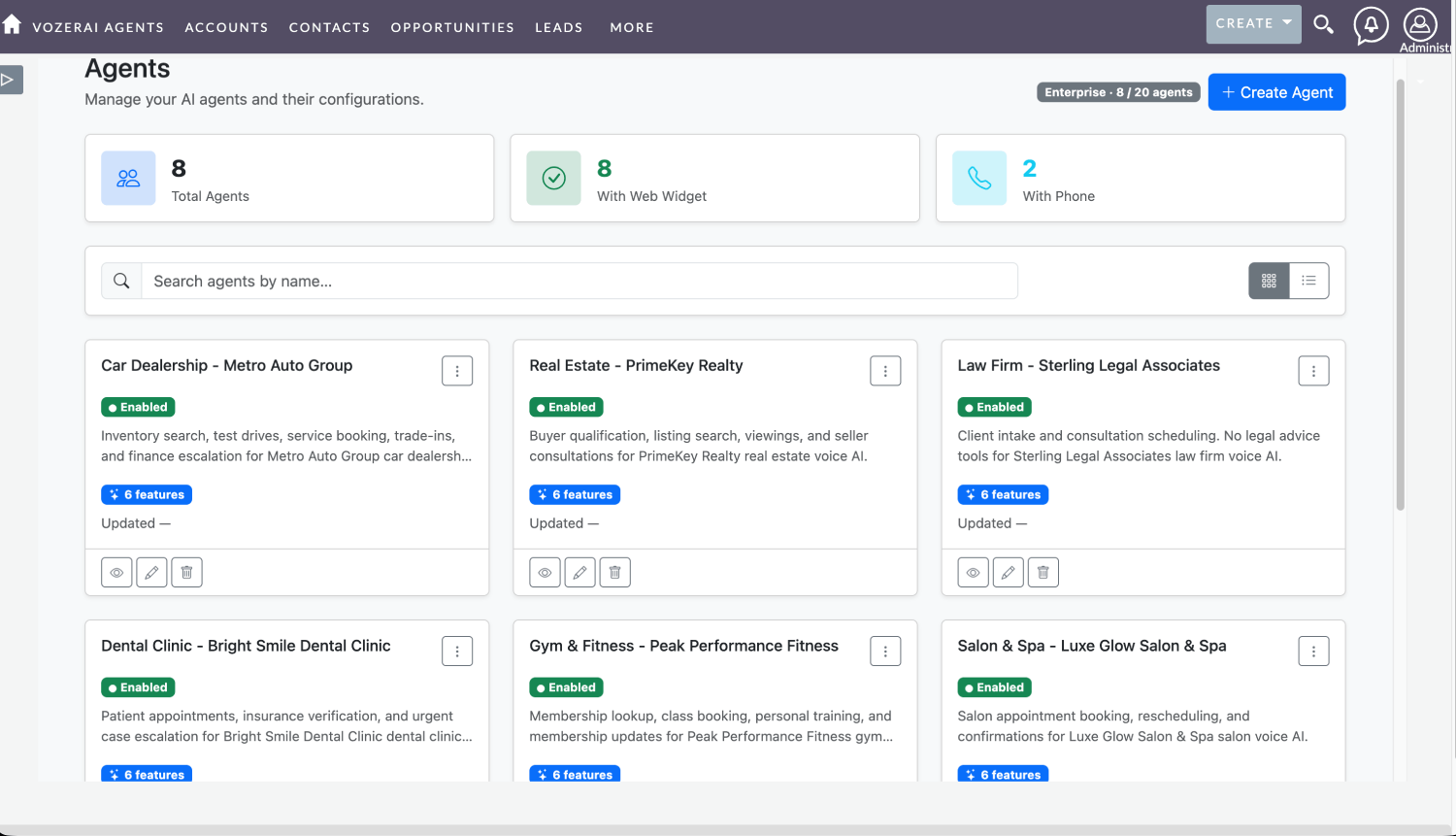
Industry agents in one CRM module
Create and manage VozerAI agents from SuiteCRM alongside Accounts, Contacts, Opportunities, and Leads. See totals for agents, web widgets, and phone deployments at a glance.
- Grid or list view of all voice AI agents
- Per-industry playbooks (dealership, real estate, law, dental, fitness, salon, and more)
- Enabled status, feature counts, and quick view/edit actions
- Plan usage visibility (for example Enterprise agent limits)
Admins stay inside SuiteCRM—no separate dialer console for day-to-day agent management.
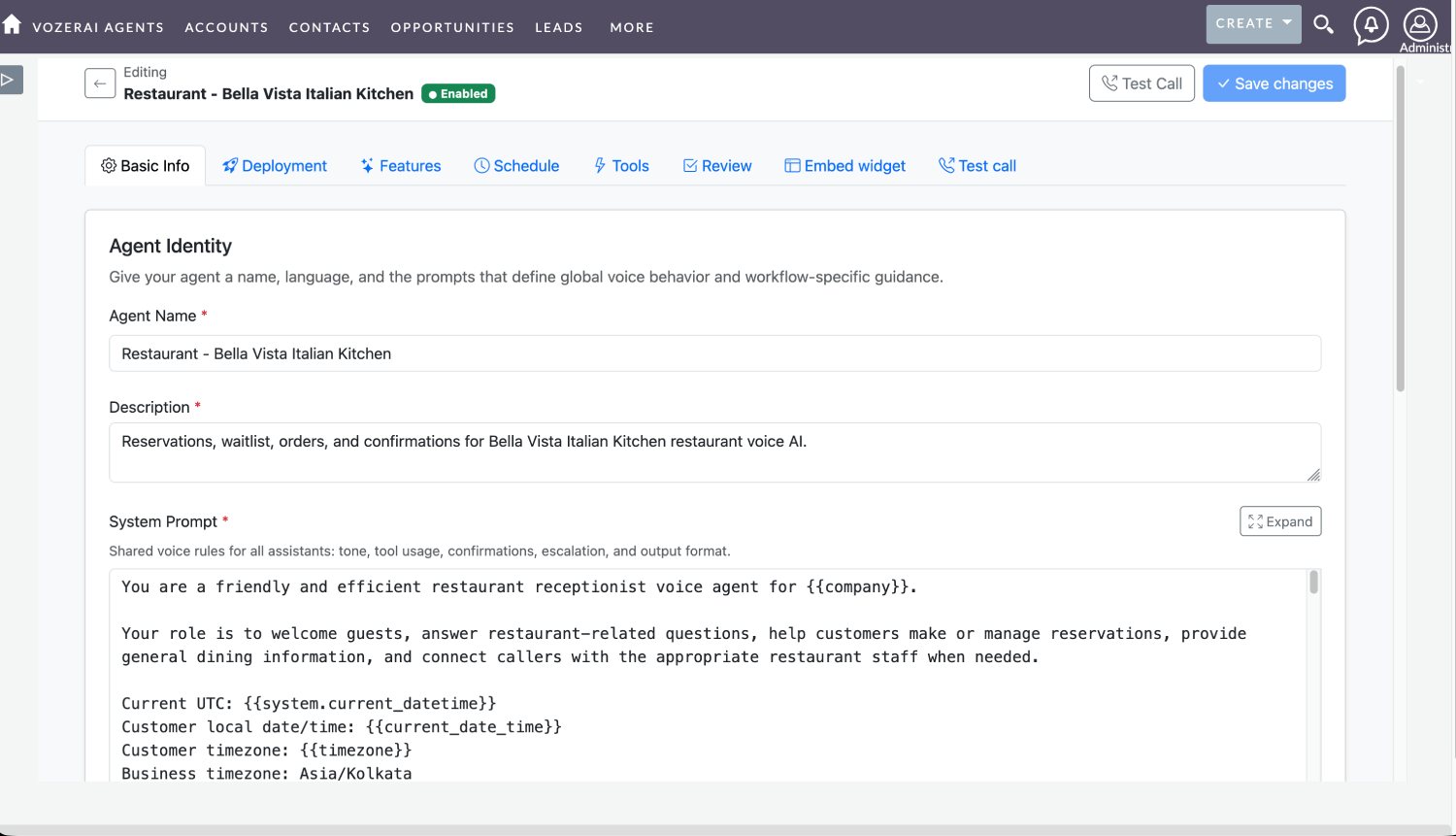
Prompts & agent identity
Define how the assistant speaks: name, description, and a system prompt with dynamic variables such as company, current date/time, and timezone.
- Persona and responsibilities in plain language
- Variables like
{{company}}and{{system.current_datetime}} - Business timezone for honest scheduling promises
- Test Call and Save changes from the same editor
Shape greeting, tone, and escalation rules so the voice matches your brand—not a generic script.
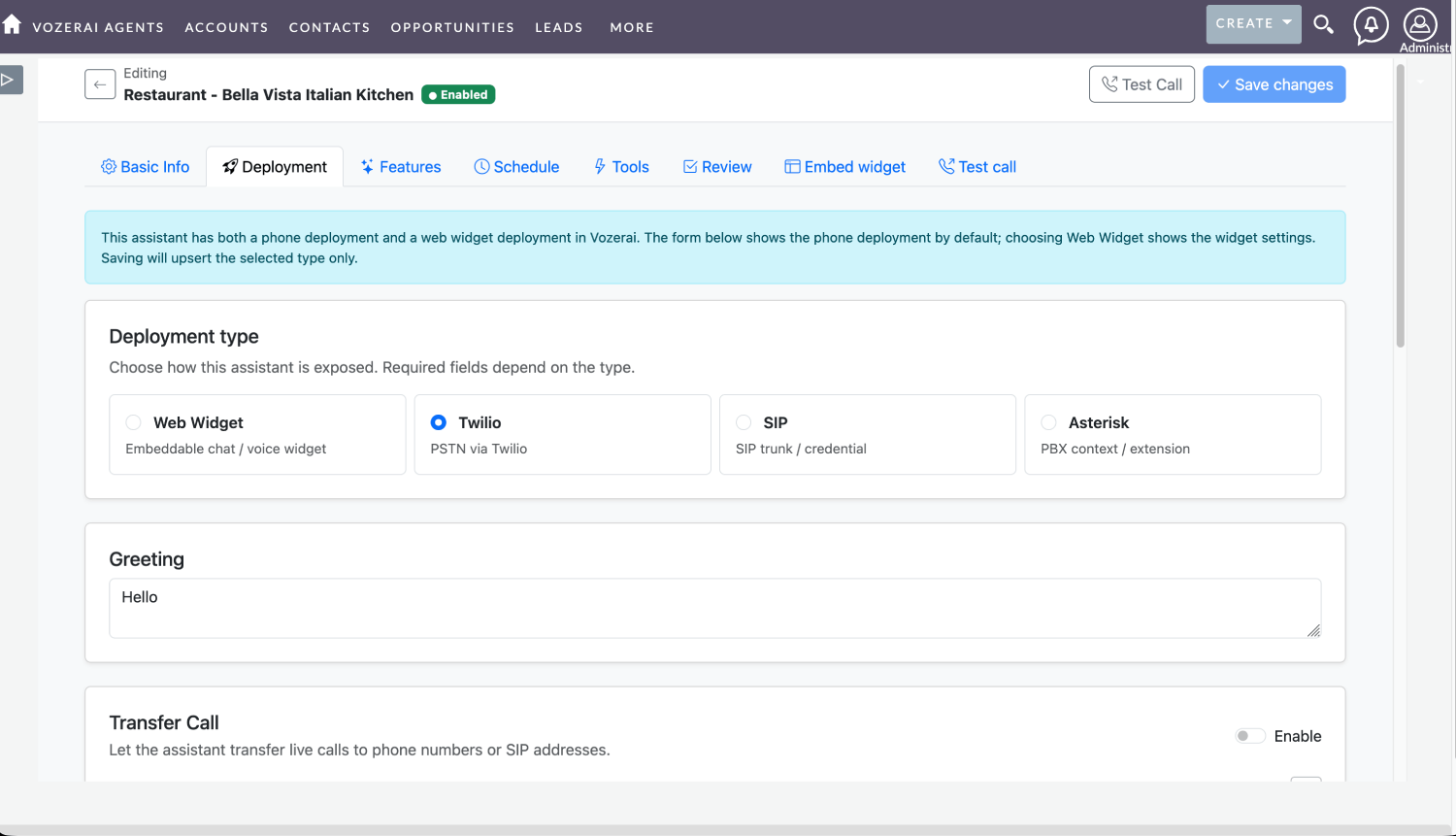
Deploy on phone or web
Choose how each agent is exposed: embeddable web widget, Twilio PSTN, SIP trunk, or Asterisk PBX—without abandoning your numbers.
- Web Widget for site chat / voice
- Twilio for public phone lines
- SIP and Asterisk for existing PBX routes
- Configurable greeting and live call transfer to phone or SIP
One agent can run phone and web together; switch deployment type and the form updates for that channel.
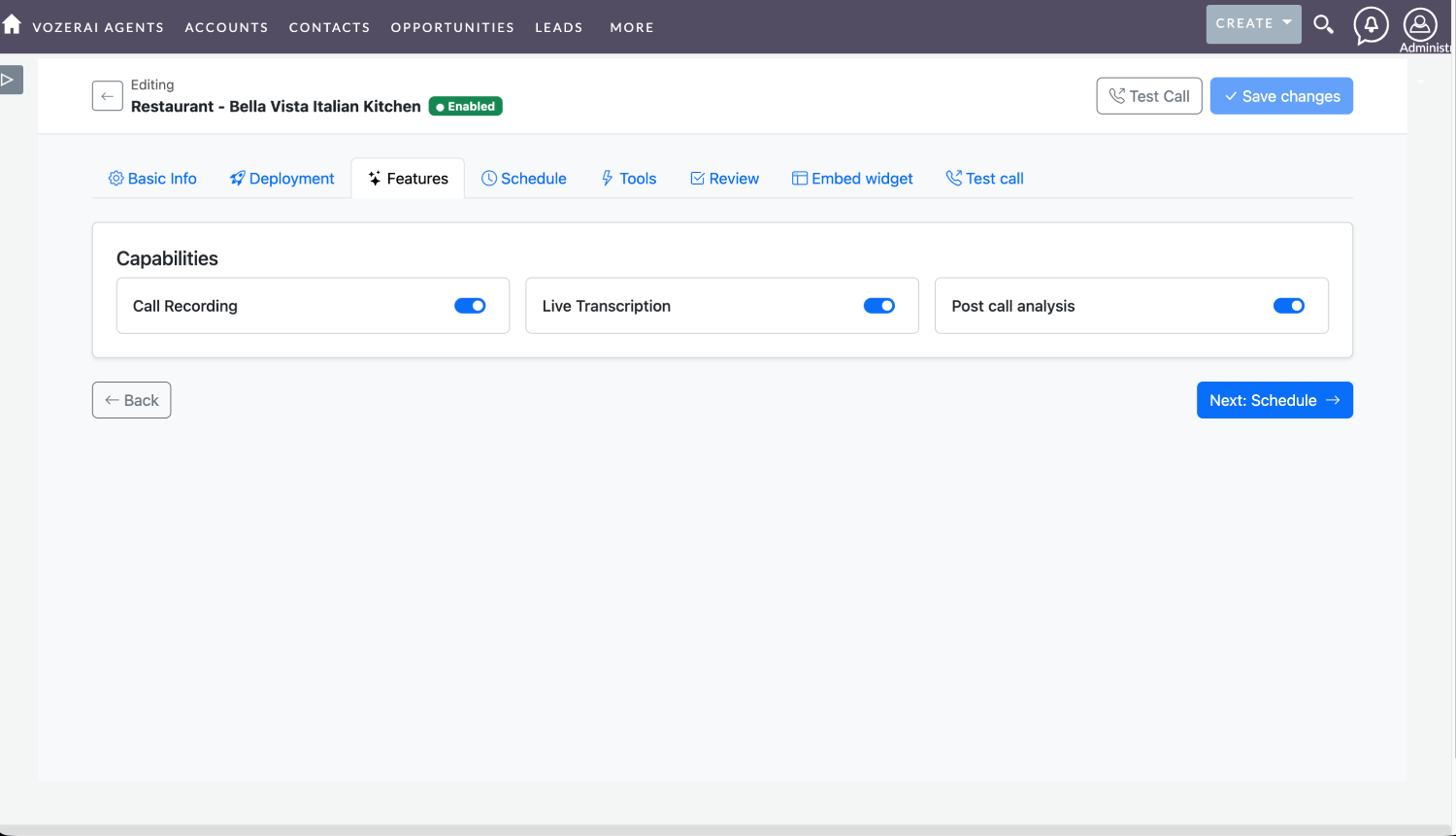
Recording, transcription & post-call analysis
Turn on the call-intelligence features your compliance and coaching teams need—without leaving the agent wizard.
- Call recording for audit and coaching
- Live transcription during the conversation
- Post-call analysis for summaries your CRM team can skim
- Toggle capabilities per agent as you roll out
Logging alone is not enough: combine recording with analysis so owners act from SuiteCRM without replaying every minute of audio.
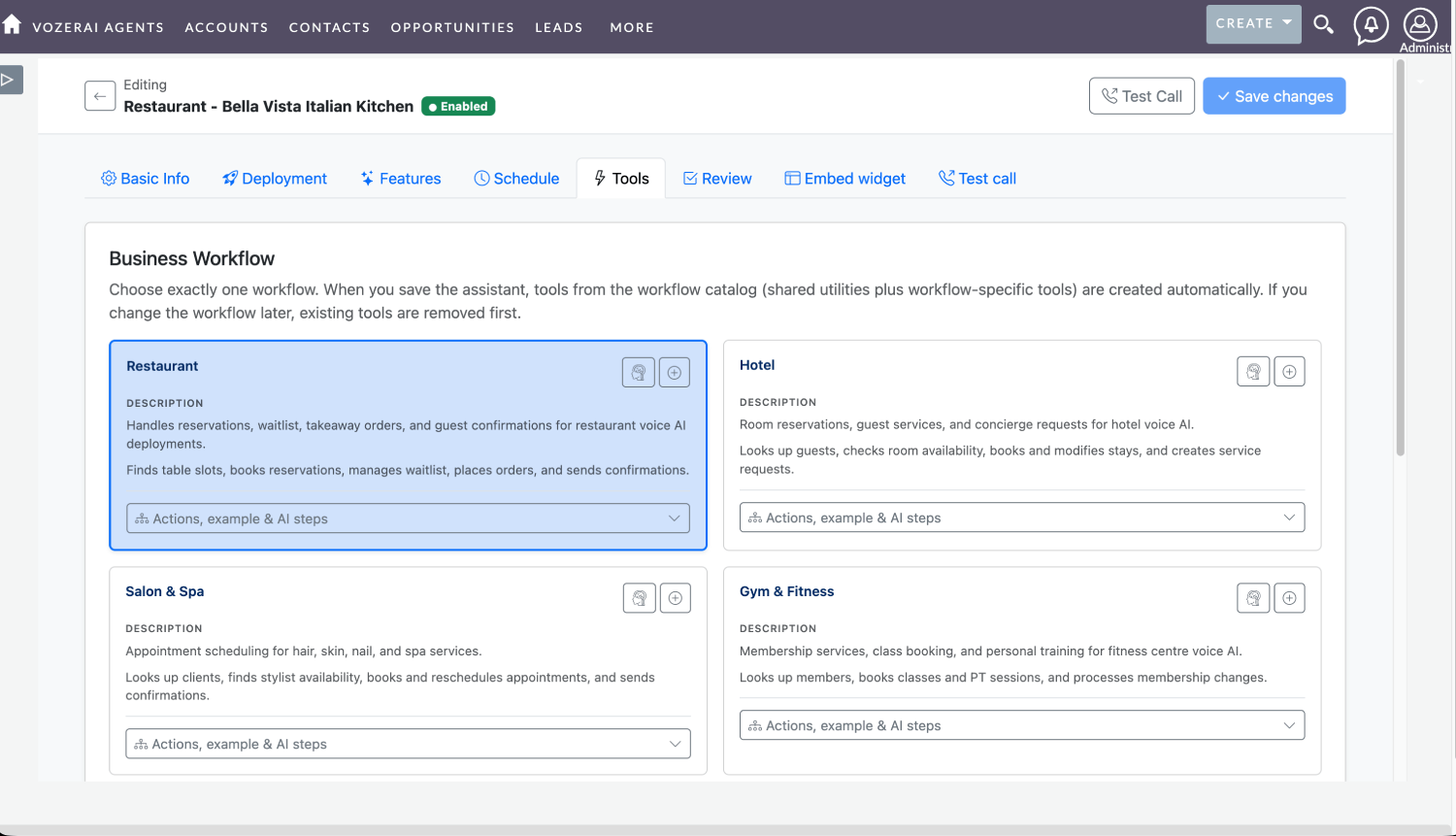
Industry tools that become CRM outcomes
Pick a business workflow and VozerAI attaches catalog tools—shared utilities plus vertical actions—so mid-call tool calls can write structured work.
- Restaurant: reservations, waitlist, orders, confirmations
- Hotel: guest lookup, room booking, service requests
- Salon & Spa: stylist availability, book / reschedule
- Gym & Fitness: membership lookup, class and PT booking
Every tool call is designed to leave a trail your SuiteCRM process can continue—not a conversation that dies when the line hangs up.
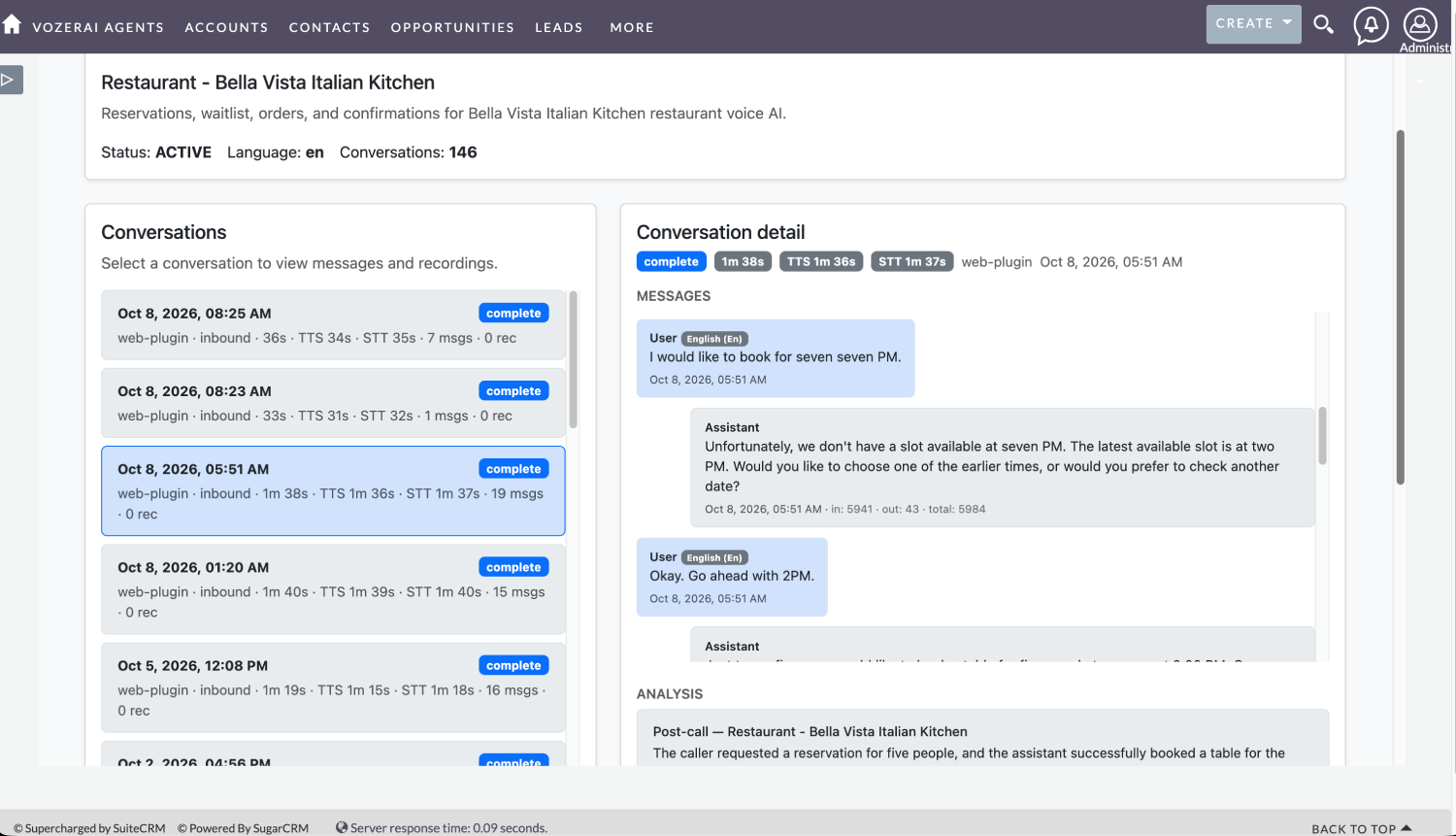
Conversations, transcripts & analysis
Review completed inbound calls: duration, source (web or phone), message count, full transcript, and AI post-call analysis in one place.
- Conversation list with complete / inbound status
- Chat-style transcript of user and assistant turns
- Post-call analysis summarizing what was booked or requested
- Visibility for coaching, QA, and CRM follow-up
When a caller books a table or asks for a callback, your team can see the outcome narrative next to the transcript—then continue from SuiteCRM.
In-call tools and CRM follow-through
How Voice AI and SuiteCRM work together
A practical voice-to-CRM pattern from ring to record.
- Connect telephony — Route your business line to VozerAI (Twilio, Asterisk, SIP, or BYOT).
- Map SuiteCRM outcomes — Decide how results land on Contacts, Leads, Accounts, Opportunities, Cases, Meetings, and Tasks for your process.
- AI answers & qualifies — Greet, look up known callers where configured, understand intent, capture details.
- Call tools mid-conversation — Book, confirm, qualify, SMS, or escalate without ending the call first.
- Write to SuiteCRM — Records, appointments, activity, AI summary, and follow-up with ownership.
- Team acts from CRM — Sales and service continue from SuiteCRM—not sticky notes or a separate dialer silo.
Answering the phone vs continuing SuiteCRM
A phone answering service reduces missed rings. CRM-connected voice keeps SuiteCRM accurate.
| What the caller experiences | What SuiteCRM still needs |
|---|---|
| Someone (or something) picks up | A clear owner and next step |
| A polite conversation | Structured details the team can trust |
| A promise to “get back to you” | A follow-up that actually appears in the CRM |
| A transferred call | Context so the human does not restart from zero |
| Call logging / recording only | Summary + task + record update you can act on without replaying audio |
SuiteCRM use cases
Sales enquiry during a busy week
While the team is in pipeline review, the AI captures intake and ownership so the request is not buried in voicemail—SuiteCRM shows who should follow up and why.
Appointment from a new visitor
Book and confirm during the call; align the outcome with SuiteCRM Meetings or calendar modules so service capacity and CRM stay in sync.
Existing customer / open matter
Answer FAQs from your knowledge base, then escalate to a specialist with CRM context when the issue is sensitive or high-value.
After-hours new lead
Overnight callers become next-day work with summary and follow-up—not a cold missed-call list waiting for someone to remember.
Industry playbooks that feed CRM
Vertical tools—book, qualify, confirm—designed so every tool call can become a CRM record.
Restaurant & hotel
- Book table / room
- Waitlist & confirm
- Guest lookup
- Service requests
Salon, gym & dental
- Find slots & book
- Reschedule / remind
- Member lookup
- Escalate clinical / sensitive
Law & real estate
- Record intake
- Book consult / viewing
- Qualify buyer
- Warm transfer
Dealership & services
- Inventory questions
- Test drive booking
- Service appointments
- CRM follow-up tasks
Why SuiteCRM teams choose VozerAI
Outcomes over answered rings
Evaluate by what SuiteCRM shows after hang-up: owner, summary, next step—not only that someone picked up.
No second customer database
Keep phone work inside your open-source CRM investment instead of email threads, sticky notes, or a shadow dialer.
Hybrid AI + humans
AI covers routine and after-hours; people handle judgment-heavy work with warm handoff and CRM context.
Configurable mapping
Fit Accounts, Contacts, Leads, Opportunities, and Cases as you already use them—validate on your instance.
Built by SuiteCRM specialists
Urdhva Tech builds SuiteCRM plugins and services—Voice AI designed with CRM process ownership in mind.
Deploy with your telephony
Twilio, Asterisk, SIP, or bring-your-own routes—keep control of numbers and escalation paths.
Ready for Voice AI that writes to SuiteCRM?
Book a guided demo and ask the litmus question: after the caller hangs up, what should SuiteCRM show your team?
In short: A Voice AI Assistant for SuiteCRM is a phone agent that greets callers, understands intent, and takes the next step—booking, qualifying, summarizing, or escalating—while mapping those results into your SuiteCRM Contacts, Leads, Accounts, Opportunities, Cases, and Tasks as configured for your instance.
Built by Urdhva Tech, VozerAI is Voice AI tightly coupled with CRM workflows: when the assistant calls a tool mid-conversation, the result is saved as structured work your team can trust. Explore the product at vozerai.com, or pair it with our SuiteCRM services and SuiteCRM plugins.
At a glance
VozerAI for SuiteCRM turns inbound voice into CRM outcomes: 24/7 answering, intent qualification, appointment booking, lead/contact capture, AI call summaries, follow-up tasks with owners, and warm human handoff. Judge it by what SuiteCRM shows after the caller hangs up—not by voice naturalness alone.
The problem
Your SuiteCRM instance already holds accounts, contacts, opportunities, and cases. Your phone line is still where many relationships begin—and where too many stall. Notes on pads never become tasks. Voicemail after a pipeline review never becomes a Lead. Call logging alone does not give ownership, summaries, or next steps.
The solution
Coverage answers the phone. CRM-connected voice answers whether the business can act after the call. VozerAI greets callers, calls tools mid-conversation, and writes structured outcomes into SuiteCRM—so sales and service work from the CRM, not a shadow dialer or CSV export.
Frequently asked questions
Direct answers for SuiteCRM admins, CRM managers, and sales or service leaders evaluating Voice AI.
- What is a Voice AI Assistant for SuiteCRM?
- It is a conversational phone agent that answers inbound calls, understands why someone called, and takes a useful next step—capturing details, scheduling, summarizing, or escalating—while writing those outcomes into SuiteCRM so your team can act without replaying audio.
- Is VozerAI just another voice bot?
- No. VozerAI is Voice AI tightly coupled with CRM workflows. When the AI calls a tool—book, lookup, qualify, confirm—the result is saved as structured CRM work (contacts, appointments, summaries, tasks), not only a polite conversation.
- Can an AI receptionist update SuiteCRM automatically?
- Yes, when integration and field mapping are configured for your instance. Modules and fields depend on deployment. Confirm create-versus-update rules, ownership, and duplicate matching in a demo against your SuiteCRM.
- Does VozerAI always create SuiteCRM Leads?
- Do not assume a fixed Lead-create path. Mapping should match how your organization uses Accounts, Contacts, Leads, Opportunities, and Cases. Treat module destinations as configuration, then validate on your instance.
- Will Voice AI replace our SuiteCRM admin or front desk?
- No. AI handles repetitive inbound and after-hours coverage. Admins own CRM design. People handle complex, sensitive, and high-value work—often after a warm handoff with context.
- How does appointment scheduling work with SuiteCRM?
- The AI can book, reschedule, confirm, and remind callers. How appointments appear in SuiteCRM calendar or Meeting modules depends on your configured mapping and deployment.
- Is call logging enough for SuiteCRM teams?
- Logging helps audit. Trusted reporting and pipeline work need structured next steps: ownership, follow-up tasks, summaries, and record context—so someone can act without listening to the full recording.
- Can AI hand off to a human while keeping SuiteCRM context?
- Yes. Warm transfer and escalation are part of the pattern. Confirm in your demo what context accompanies the handoff so the human does not restart from zero.
- How do we avoid duplicate contacts from phone AI?
- Use matching rules (often phone-based), prefer update-over-create where appropriate, and review write policies before go-live. Test production-like calls and inspect SuiteCRM records for duplicates and field quality.
- What should we test before buying?
- Run production-like calls and inspect SuiteCRM for outcomes, summaries, follow-ups, and human transfer. Check duplicates and fields. Ask: can a user act from the CRM record without replaying the audio?