

Meta leads
Meta Leads for SuiteCRM syncs Facebook Lead Ads and Instagram Lead Ads straight into SuiteCRM as Leads—so marketing runs paid social forms while sales follows up in the CRM, without downloading CSVs from Meta.
When someone fills a Meta lead form on Facebook or Instagram, that interest reaches SuiteCRM quickly with clear source labeling, the right form answers on the Lead, and ownership your team can act on. You choose which pages and forms to import, map custom questions to SuiteCRM fields, and keep a full history of every submission for follow-up and reporting.
Built for sales and marketing teams that already live in SuiteCRM, Meta Leads keeps paid social demand and CRM pipeline in one place—so fewer leads go cold waiting on a spreadsheet handoff.
Setup is covered in the Meta Leads Admin Guide. Read more in our article: Sync Facebook & Instagram leads to SuiteCRM. For custom SuiteCRM work, see our SuiteCRM development and customization services.
What is Meta Leads for SuiteCRM?
Meta Leads is a SuiteCRM Facebook and Instagram Lead Ads integration. It connects Meta Lead Ads to SuiteCRM so every form fill from Facebook or Instagram can become a SuiteCRM Lead automatically—with form selection, field mapping, assignment, missed-lead recovery, and submission history.
Instead of exporting lead CSVs from Meta Ads Manager and uploading them later, your team works Facebook and Instagram demand inside the same CRM used for pipeline, tasks, and reporting.
At a glance
Sync Facebook and Instagram Lead Ads to SuiteCRM automatically. Connect pages and accounts, choose which forms to import, map answers to Lead fields, assign owners, recover missed leads, and keep a clear history of every Meta form fill.
How Facebook and Instagram leads sync to SuiteCRM
Five steps from Meta Lead Ads to SuiteCRM pipeline—without spreadsheet handoffs.
- Connect Facebook Pages and Instagram accounts in SuiteCRM Meta Leads Connected Accounts, including Business Portfolio pages.
- Choose which Meta lead forms to import—enable only the Facebook or Instagram Lead Ad forms that should create SuiteCRM Leads.
- Map form answers to SuiteCRM Lead fields. Name, email, and phone map automatically; map or skip custom questions.
- Set assignment rules per page or account: specific user, round-robin, security group, or unassigned.
- Follow up in SuiteCRM with Meta Lead Submissions history, campaign context, and missed-lead recovery for recent gaps.
Features of Meta Leads for SuiteCRM
Everything your sales and marketing teams need to turn Meta Lead Ads into SuiteCRM pipeline—without leaving the CRM.
Facebook Lead Ads into SuiteCRM
Bring Facebook Lead Ad form fills into SuiteCRM as Leads automatically—ready for follow-up the moment someone submits the form.
Instagram Lead Ads into SuiteCRM
Capture Instagram Lead Ads the same way, with clear Instagram source labeling so teams know where each opportunity came from.
Instant lead delivery
Stop waiting on end-of-day CSV exports. New Meta form submissions flow into SuiteCRM so sales can respond while interest is high.
Multiple Facebook Pages
Connect more than one Facebook Page—including pages in a Business Portfolio—and manage them from one Meta Leads screen.
Linked Instagram accounts
Work with Instagram business accounts linked to your Facebook Pages so Instagram Lead Ads land in the same SuiteCRM workflow.
Choose which forms to import
Refresh Meta lead forms per page or account and enable only the forms that should create SuiteCRM Leads.
Map answers to Lead fields
Map Meta form questions to SuiteCRM Lead fields. Name, email, and phone map automatically; custom questions stay under your control.
Assign leads automatically
Send new Meta leads to a specific salesperson, rotate round-robin, use a security group, or leave unassigned—set per page or account.
Never miss a lead
Built-in recovery finds recent Meta leads that did not arrive the first time, retries failed imports, and helps avoid duplicate Leads.
Meta Lead Submissions history
Review every form fill in SuiteCRM—platform, form, page, and submission details—linked to the related Lead and Contact.
Campaign and ad visibility
See campaign, ad, and form context with each submission so marketing and sales share one view of paid social performance.
Built for SuiteCRM teams
Marketing runs Facebook and Instagram Lead Ads; sales works follow-up in SuiteCRM Leads—with source and history in one place.
See Meta Leads in SuiteCRM
Three product views that show how Facebook and Instagram Lead Ads become SuiteCRM pipeline.
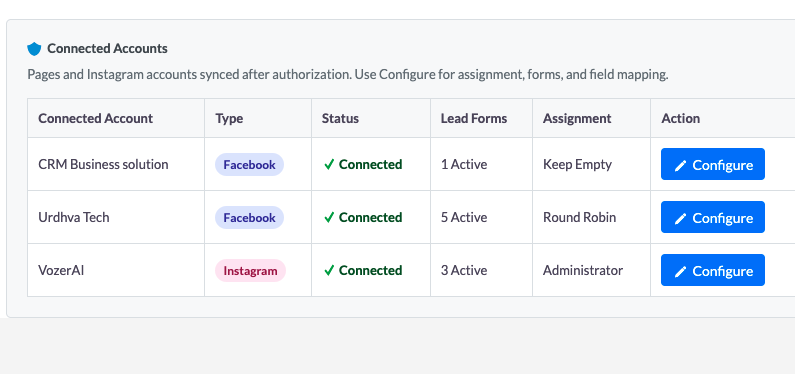
Connect Facebook Pages and Instagram accounts
Authorize Meta once and see your advertising pages and linked Instagram accounts in Connected Accounts. Support multiple Facebook Pages and Business Portfolio pages from one place.
- Multiple Facebook Business Pages in one CRM
- Linked Instagram business accounts
- Pages from a Business Portfolio included with your other pages
- Status and quick configuration per account
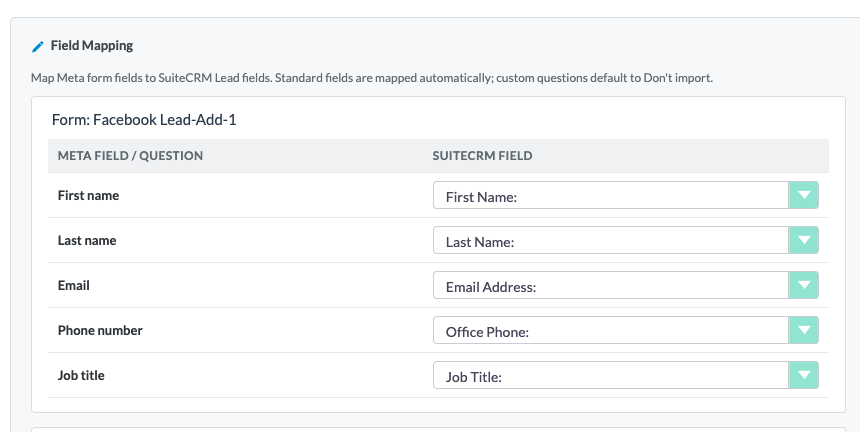
Choose forms and map answers to Leads
Pull Meta lead forms into SuiteCRM, enable only the campaigns you care about, and map form answers to Lead fields. Skip questions you do not need in the CRM.
- Refresh forms when Meta campaigns change
- Enable or disable forms per Facebook or Instagram account
- Automatic mapping for name, email, and phone
- Custom questions mapped or left out on purpose
- Split full name into First Name and Last Name
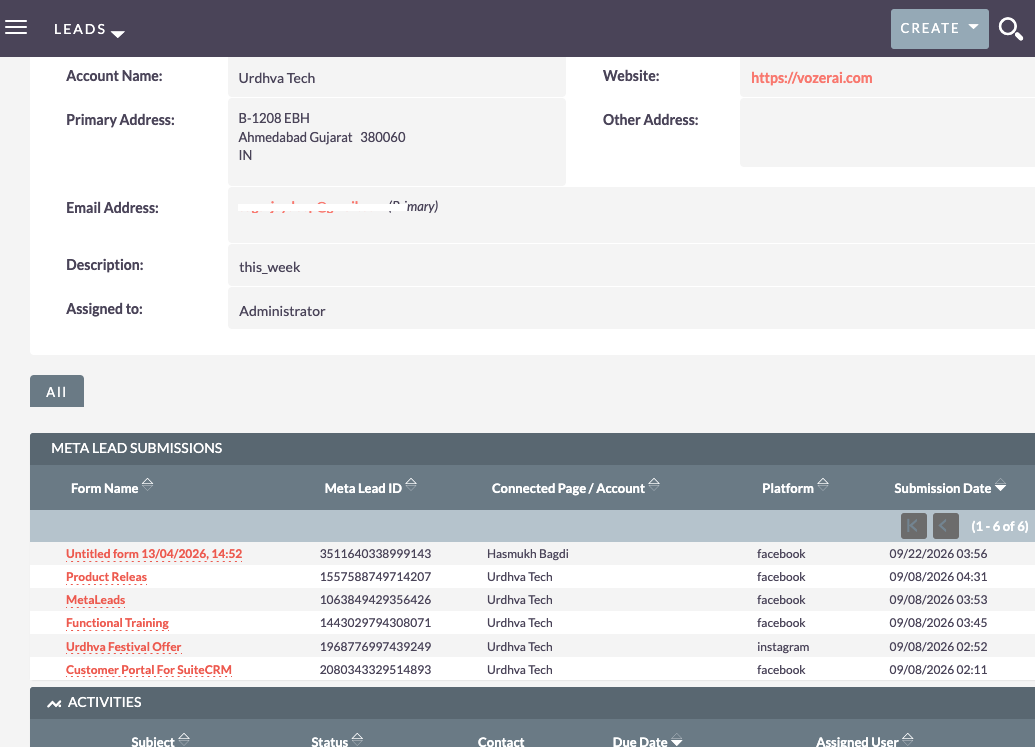
Lead history and campaign visibility
Meta Lead Submissions keeps a durable record of every form fill. Teams see platform, form, page, and campaign context—and open the related SuiteCRM Lead or Contact in one click.
- Facebook and Instagram platform on each submission
- Form name, page, and submission time
- Original answers available for review
- Links to Lead and Contact records
- Campaign and ad details for attribution
The problem
Facebook and Instagram Lead Ads create demand, but form fills often sit in Meta until someone downloads a CSV. Leads go cold, ownership is unclear, and marketing cannot see which campaigns turned into SuiteCRM pipeline.
The solution
Meta Leads delivers Facebook and Instagram Lead Ads into SuiteCRM Leads automatically—with form selection, field mapping, assignment rules, missed-lead recovery, and submission history your whole team can trust.
Who Meta Leads is for
Marketing teams running Meta Lead Ads
Keep Facebook and Instagram form campaigns connected to SuiteCRM. Choose forms, protect data quality with field mapping, and see campaign context on every submission.
Sales teams working SuiteCRM Leads
Receive new Meta leads with clear Facebook or Instagram source, automatic assignment, and history on the Lead—so follow-up starts in the CRM, not in a spreadsheet.
Why teams choose Meta Leads
Faster speed-to-lead
Facebook and Instagram form fills reach SuiteCRM quickly so your team can call or email while interest is fresh.
One CRM for paid social
Stop juggling Meta downloads and CRM updates. Leads, history, and ownership live in SuiteCRM.
Fewer missed opportunities
Missed-lead recovery and smart assignment help ensure every valuable form fill gets a fair chance at follow-up.
Frequently asked questions
Common questions about Facebook Lead Ads, Instagram Lead Ads, and Meta Leads for SuiteCRM.
- What is Meta Leads for SuiteCRM?
- Meta Leads is a SuiteCRM plugin that syncs Facebook Lead Ads and Instagram Lead Ads into SuiteCRM as Leads automatically, so sales can follow up in the CRM instead of downloading spreadsheets from Meta.
- How do I sync Facebook leads to SuiteCRM?
- Install Meta Leads, connect your Facebook Pages in Connected Accounts, enable the Lead Ad forms you want, map answers to SuiteCRM Lead fields, and set assignment. New Facebook form fills then create SuiteCRM Leads automatically.
- Can I import Instagram Lead Ads into SuiteCRM?
- Yes. Meta Leads supports Instagram Lead Ads for Instagram business accounts linked to your Facebook Pages, with clear Instagram source labeling on each SuiteCRM Lead.
- Does it support both Facebook and Instagram Lead Ads?
- Yes. Leads from Facebook Lead Ads and Instagram Lead Ads can flow into SuiteCRM, with clear Facebook or Instagram source labeling on each lead.
- Which SuiteCRM versions are supported?
- Meta Leads supports SuiteCRM 7 and SuiteCRM 8.8 or greater.
- Can I choose which Meta lead forms create SuiteCRM leads?
- Yes. You can connect your pages and accounts, refresh your Meta lead forms, and enable only the forms you want imported into SuiteCRM.
- Can form answers map to SuiteCRM Lead fields?
- Yes. Standard details such as name, email, and phone map automatically, and you can map or skip custom questions so only useful data lands on the Lead.
- How are new Meta leads assigned to salespeople?
- You can leave leads unassigned, send them to a specific user, rotate them round-robin among selected users, or rotate among users in a security group—configured per Facebook Page or Instagram account.
- What if a lead is missed when the form is submitted?
- Meta Leads includes missed-lead recovery that looks back over recent submissions, retries failed imports, and helps prevent duplicate SuiteCRM leads for the same Meta form fill.
- Can I see Facebook and Instagram submission history in SuiteCRM?
- Yes. Meta Lead Submissions keeps a history of each form fill—including platform, form, page, and campaign details—and links submissions to related Lead and Contact records.
Get Meta Leads for SuiteCRM
Start capturing Facebook and Instagram Lead Ads in SuiteCRM today.

Learn more: Sync Facebook & Instagram leads to SuiteCRM